Advanced GA4 integration for Gorgias
Connect Gorgias live chat events with Shopify revenue in Google Analytics 4


The direct answer
How does Littledata connect Gorgias to GA4?
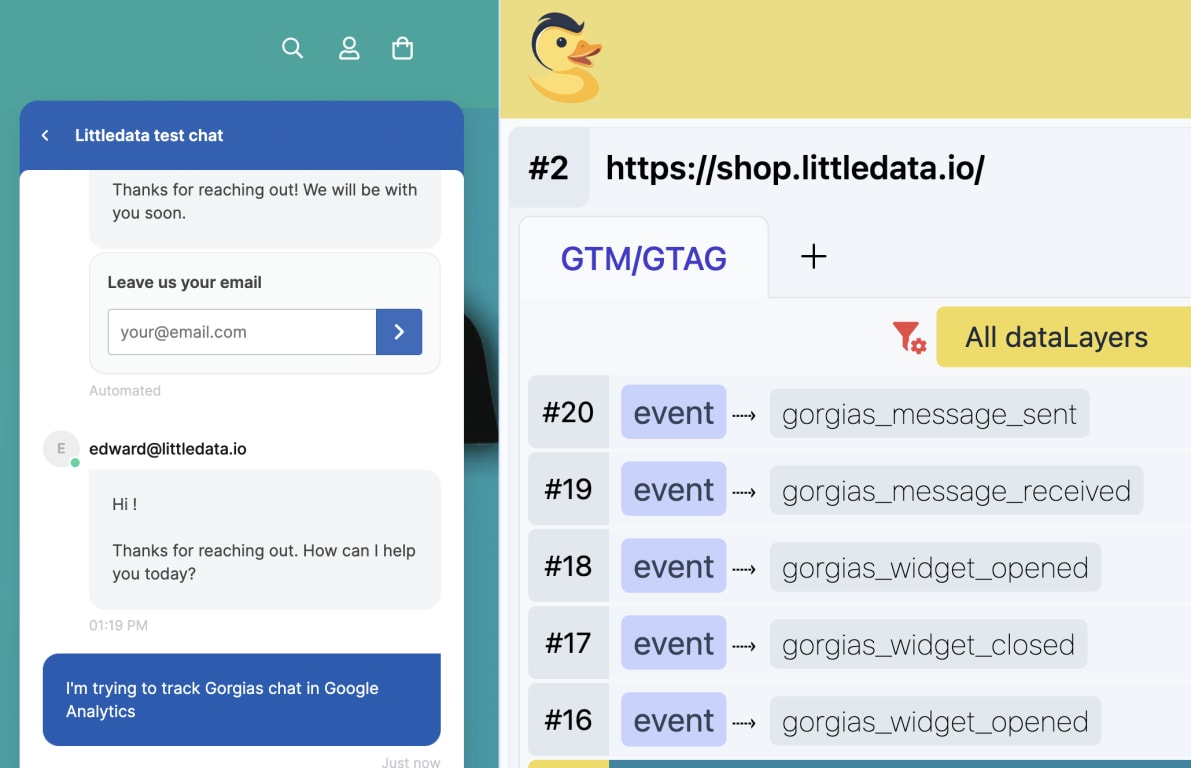
A short script from Littledata relays four Gorgias live chat events to Google Analytics 4: widget opened, widget closed, message sent, and message received. Littledata's server-side Shopify tracking sends add to cart, checkout, and purchase events to the same GA4 property, so you can see how chat conversations lead to orders.
- Chat linked to revenue - compare conversion rate for shoppers who chatted against those who didn't.
- Chat by channel and product - split live chat usage by marketing channel or product, and spot trends.
- Usability checks - look at widget open rate by screen size or browser.
Which Gorgias events can you track in GA4?
| GA4 event | When it fires |
|---|---|
| gorgias_widget_opened | The chat widget is opened |
| gorgias_widget_closed | The chat widget is closed |
| gorgias_message_sent | A customer sends a message |
| gorgias_message_received | A customer receives a message |
How do I set up Gorgias tracking?
Connect Shopify to GA4
Install Littledata from the Shopify App Store and connect your GA4 property.
Add the Gorgias script
Paste Littledata's script into your Shopify theme.liquid file. It waits for the Gorgias widget to load, then passes chat events to GA4 with the gtag library.
Test in Realtime
Open the chat widget on your store and check the events in GA4's Realtime report. They appear under Reports > Engagement > Events within 24 hours.
Build a chat segment
Create a segment of users with a gorgias_message_received event and compare their purchase rate with users who didn't chat.
Adapt the script The full script is published in the help center, so you can change it to track other Gorgias events or send them to another destination. Get the Gorgias script
Where do Gorgias events appear in GA4 reports?
Gorgias has its own help desk analytics, but they stop at the conversation. Once the Littledata script is live, chat events show up in Google Analytics 4 next to your Shopify orders, in two places.
Realtime report, for testing. Open the chat widget on your store and send a message. The gorgias_widget_opened and gorgias_message_sent events show up in GA4's Realtime report, so you can confirm the script works before you rely on the data. If gtag hasn't loaded when a chat event fires, the script queues the event until Google Analytics is ready.
Reports > Engagement > Events, for analysis. Within 24 hours, all four Gorgias events appear in the standard Events report alongside Littledata's add to cart, checkout, and purchase events.
With the events in GA4, you can answer questions such as:
- Do shoppers who chat buy more? Build a segment of users with a gorgias_message_received event and compare their ecommerce conversion rate with users who didn't receive a message.
- Does more messaging lead to more sales? Look at the volume of chat events per user and see whether a certain amount of messaging drives purchasing.
- Where does chat demand come from? Break chat events down by marketing channel, product, screen size, or browser.
Works with the apps you already use
Littledata's revenue tracking works alongside Gorgias and the rest of your Shopify stack.
- Own the data in Google Analytics - orders, refunds, and checkout steps sent server-side.
- Sessions stitched together automatically - link chat interactions with adds to cart and purchases.
- Orders from the Gorgias sales channel - add a gorgias / app source/medium rule so they aren't reported as (not set).
- Works with Recharge, Klaviyo, Shopify and more - one data layer for GA4, Klaviyo, and Meta.
What Shopify brands say about Littledata
Having precise tracking for all platforms has really improved our ad performance and the customer support from the Littledata team is unmatched. They are responsive, helpful, super knowledgeable, and very willing to hop on a call and fix things that we broke (ha!).
Highly recommend Littledata! The tool is genuinely helpful for accurate tracking and analytics integrations, but what really stands out is their amazing support team. The team is incredibly helpful, knowledgeable, and dedicated. They don't just provide generic answers they actually investigate issues, explain everything clearly, and go the extra mile to find real solutions. You can tell they genuinely care about their customers. Honestly, one of the best support experiences I've ever had. Great product and an even better team! :)
This is a fantastic app that syncs data with a high degree of accuracy between Google Analytics and Shopify. It means I'm able to make decisions based on what I see in Google Analytics with confidence. I can also analyse data by first time orders, recurring (subscriptions) and lifetime value which is essential for evaluating campaign performance. Importantly, Littledata's support is excellent! They're very responsive, hands-on, always provide useful information and, in the rare occasions when one is needed, a fix. Highly recommended!