Accurate marketing data with Recharge
Track every Recharge order in GA4, Meta, and Google Ads, and see which campaigns win your best subscribers


Why Littledata
Get credit for every Recharge subscription
Recharge creates renewals on schedule, with no visit to your website, so browser tags and pixels never see them. Littledata sends every Recharge order from the server, so your marketing tools see the whole subscription.
Renewals credited to the right channel
Recurring revenue is attributed to the campaign that won the subscriber, not reported as Direct or (not set).
Ads that find new subscribers
Meta and Google Ads get a separate conversion for first subscription orders, so they bid for new customers, not ones you already have.
See which channels bring subscribers who stay
Compare lifetime value, cancellations, and failed payments by the channel that brought each customer in.
What makes Recharge subscription tracking reliable?
Reliable subscription tracking records every order Recharge creates, credits it to the right channel, and tells your ad platforms which orders are new subscribers.
Browser tags and pixels alone
Renewals go missing
A renewal has no browser session, so no tag or pixel fires.
Recurring revenue lands in Direct
Renewals arrive with no campaign attached, so GA4 reports them as Direct or (not set).
Renewals inflate ROAS
When renewals count as ad conversions, Meta and Google Ads take credit for customers you already have.
Churn is disconnected
Cancellations and failed payments stay in Recharge, away from the campaign that won the customer.
With Littledata
Every order recorded
One-off, first subscription, renewal, and prepaid orders are sent server-side to GA4, Meta, Google Ads, and Segment, labelled by type.
Renewals keep their original channel
Recurring orders are attributed to the first order's source.
New subscribers as their own conversion
Subscribe for Meta and New Customer Purchase for Google Ads, so bidding learns from new subscribers.
Lifecycle events tied to the campaign
Created, updated, skipped, cancelled, and charge failed events, linked to the customer's original web session.
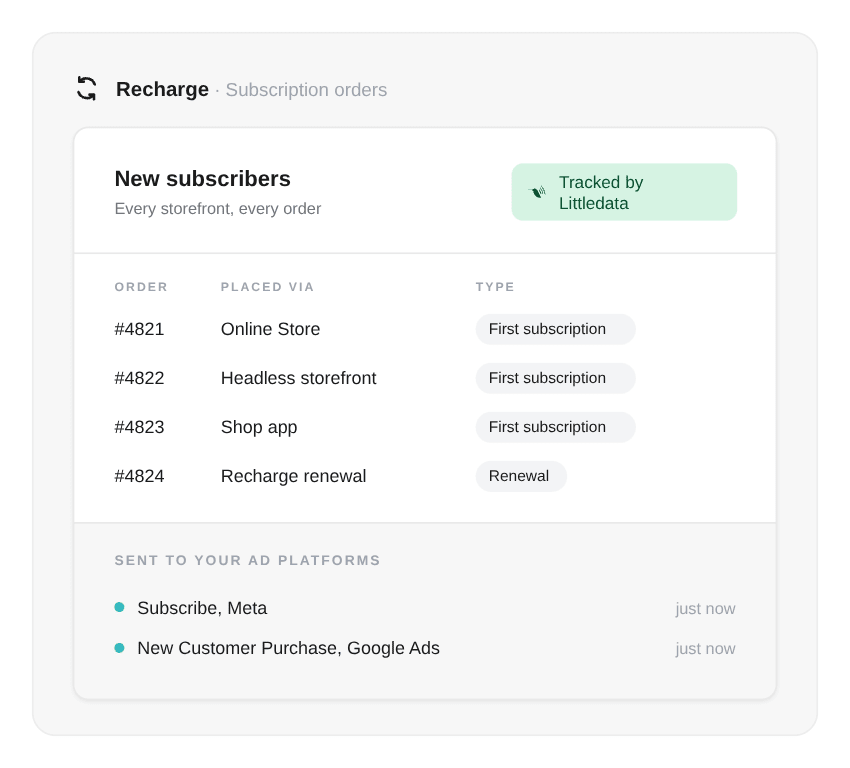
Ads that find more new subscribers
Littledata tells Meta and Google Ads which orders are new subscribers, so your campaigns optimize for the customers you want more of.
- Meta - every first subscription is sent through the Conversions API as a Subscribe event. Add it in one click with the First recurring purchase recipe.
- Google Ads - optimize to New Customer Purchase - Littledata, and use the Event Editor to keep renewals out of Smart Bidding.
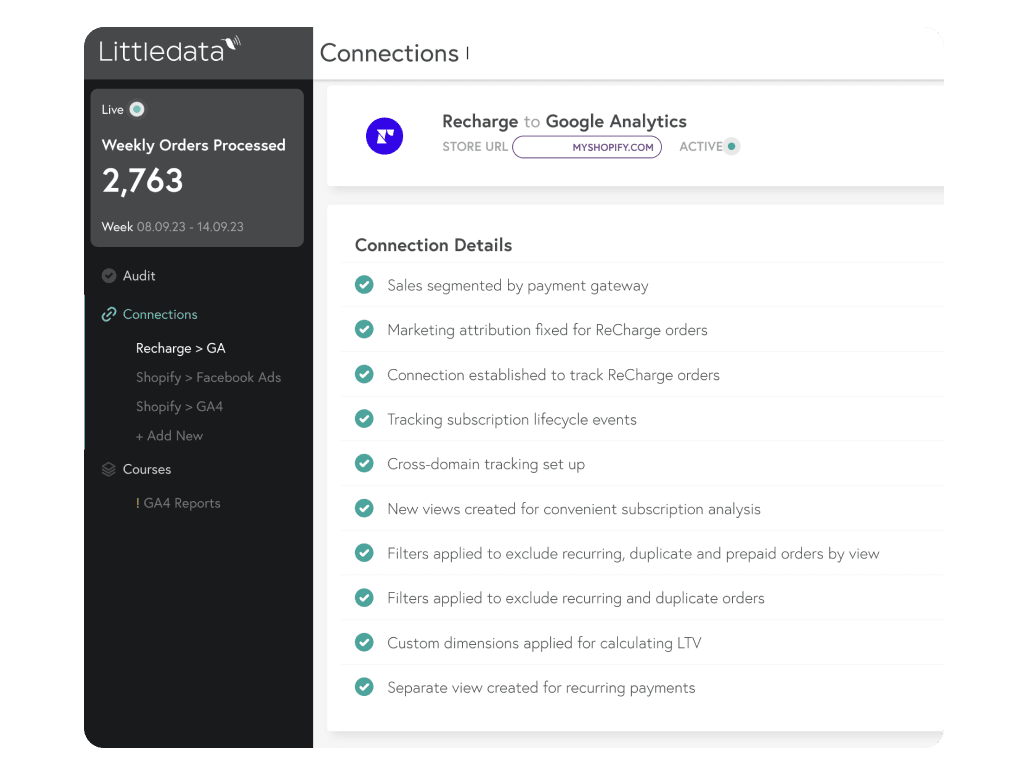
Recurring revenue by channel in GA4 and Segment
See which channels bring in subscribers who stay, with every Recharge order and subscription change in the tools you already use.
- Google Analytics 4 - orders, refunds, and lifecycle events, with renewals attributed to the first order's source.
- Segment - subscription events with status, order interval, and value, ready to trigger messages in tools like Iterable.
Recharge data in Google Analytics
How Littledata labels each Recharge order and event in GA4, so you can split reports, build segments, and create audiences.
| Recharge data | What GA4 receives |
|---|---|
| One-time order | Affiliation: Shopify |
| First subscription order | Affiliation: Subscription, Subscription First Order |
| Recurring order | Affiliation: Subscription, Subscription Recurring Order |
| Prepaid recurring order | Affiliation: Prepaid, Subscription, Subscription Recurring Order |
| Subscription lifecycle | subscription_created, subscription_updated, subscription_skipped, subscription_cancelled, subscription_charge_failed |

Honest email attribution in Klaviyo
With Littledata's Klaviyo integration, you can keep Recharge renewals out of the Placed Order - Littledata metric. Your campaign and flow revenue then shows the orders your emails actually drove.
Recharge brands growing with accurate subscription data
50x
online revenue growth at Grind
100%+
subscriber growth at Origin Coffee
25%
year-over-year retention lift at Geologie
How do I set up Littledata with Recharge?
Install Littledata
Add the Littledata app from the Shopify App Store and connect your destinations, such as GA4, Meta, and Google Ads. No code or Google Tag Manager needed.
Connect Recharge
In Recharge Admin, open Marketplace, search for Littledata, and click Get. Or open the Recharge source in the Littledata dashboard and authorize Recharge.
Add the Affiliation dimension
Create an event-scoped custom dimension for affiliation in GA4, so you can split reports by order type.
Verify subscription orders
Check GA4's Realtime report once recurring orders come in. Subscription conversions and lifecycle events appear alongside your other events.
Subscriptions started before you installed? Littledata tracks data from install onward and never changes historic data. For older subscriptions, add a source/medium rule such as recharge / recurring under Session enrichment, so their renewals aren't reported as (not set). See the Recharge setup guide
What Shopify brands say about Littledata
Littledata is very helpful in ensuring our data from Shopify and Recharge in Google Analytics is clean and accurate. David has been especially helpful in helping me get our Littledata account set up!
A fantastic app with amazing service. We use Littledata to split out our subscription orders in Google analytics to give us improved reporting capacity.
This is a fantastic app that syncs data with a high degree of accuracy between Google Analytics and Shopify. It means I'm able to make decisions based on what I see in Google Analytics with confidence. I can also analyse data by first time orders, recurring (subscriptions) and lifetime value which is essential for evaluating campaign performance. Importantly, Littledata's support is excellent! They're very responsive, hands-on, always provide useful information and, in the rare occasions when one is needed, a fix. Highly recommended!
Advanced tracking for Shopify stores using Recharge

Capture data at every turn
In this ebook, you'll learn how to:
- Fix your subscription analytics at the source
- Calculate customer lifetime value (LTV)
- Get accurate marketing attribution
- Make better decisions for your store